There are 3 roles in Meeting
Presenter
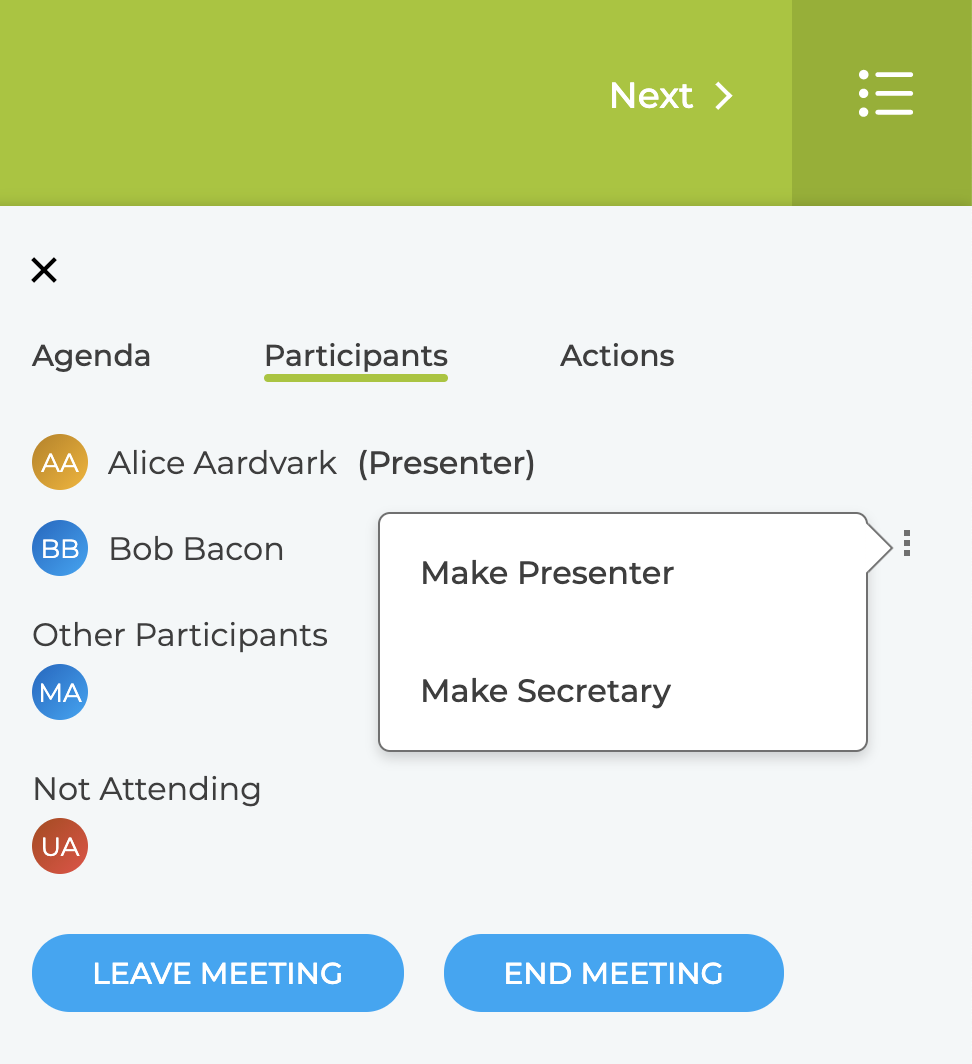
This user controls the navigation of the meeting and the other online participants see the same view as the Presenter. The Presenter role can be changed to any other participant using Settings menu shown below.
The first person into the meeting becomes the presenter and if the Presenter leaves the meeting the role is automatically passed to another participant.
Secretary
This is an optional role and if assigned the user can enter the Actions and Notes during the meeting and can move between the sections without affecting the other participants view.
Online Participants
Anyone else who is logged into ZOKRI and viewing the meeting is an Online Participant. They cannot enter Actions or Notes and cannot navigate through the meeting.
Other / Offline Participants
This is not a role but are the people attending the meeting in person either in the room or online via video conference. They are marked as participating by the Presenter / Secretary.
In this example
- Alice is the Presenter
- Bob is just an Online Participant but could be made Presenter or Secretary
- MA is attending the meeting in person / via video conference
- UA is not attending